
When to Use Backend MCP Servers vs Browser WebMCP Tools
Teams adding AI capabilities to an existing software product run into an awkward architectural fork early on. They usually handle it either by standing up a separate backend connector layer for every workflow, or by pointing a browser automation agent at their web UI and hoping CSS selectors hold together across releases. Both approaches solve part of the job, however they fail in opposite ways, which is why the Model Context Protocol (MCP) ecosystem now spans two distinct layers: backend MCP servers and in-browser WebMCP tools.
In this architecture guide we compare backend Model Context Protocol (MCP) servers against WebMCP, explain what changes at the authentication and state layers, and show when a production system benefits from running both together. If you want the TypeScript and Vue implementation side rather than the system design view, read the companion engineering walkthrough on registering browser AI tools with WebMCP.
Why one protocol was not enough
Backend MCP solved a real integration bottleneck when teams needed external hosts like Claude, ChatGPT, Copilot, or n8n to reach internal APIs and databases through one standardized contract, which we covered in our earlier MCP protocol overview. Because those tool calls run out-of-band between the AI platform and a backend server, they work well whenever nobody is looking at a browser screen.
The trouble starts when a user is already sitting inside an interactive web application, such as a clinical schedule, a construction finance grid, or a code review queue, and wants an assistant to help inside that live workspace. Routing that request through a remote backend MCP server creates three practical headaches:
- UI disintermediation. The agent hits the database or API behind the user's back, so the screen in front of the person does not reflect changes cleanly unless you build extra realtime sync plumbing.
- Duplicated session and draft state. A remote server cannot see unsaved form inputs, active filters, selected table rows, or local browser state without mirroring all of it over the network.
- Extra infrastructure for client-side tasks. Exposing simple UI actions, such as sorting a table or prefilling a multi-step form, forces engineers to maintain a separate backend service when the page already holds the logic in JavaScript.
Without a standard client-side contract, browser agents fell back to visual scraping, accessibility-tree snapshots, and simulated clicks. That brittle loop is slow, burns tokens on raw DOM markup, and breaks whenever a front-end component changes its layout.
How WebMCP fits next to backend MCP
WebMCP, incubated inside the W3C Web Machine Learning Community Group, adds a browser-native tool surface via document.modelContext.registerTool(). Rather than scraping buttons or bypassing your web app entirely, a running page exposes typed JavaScript functions with JSON Schemas and plain-English descriptions directly to a browser-integrated agent or extension.
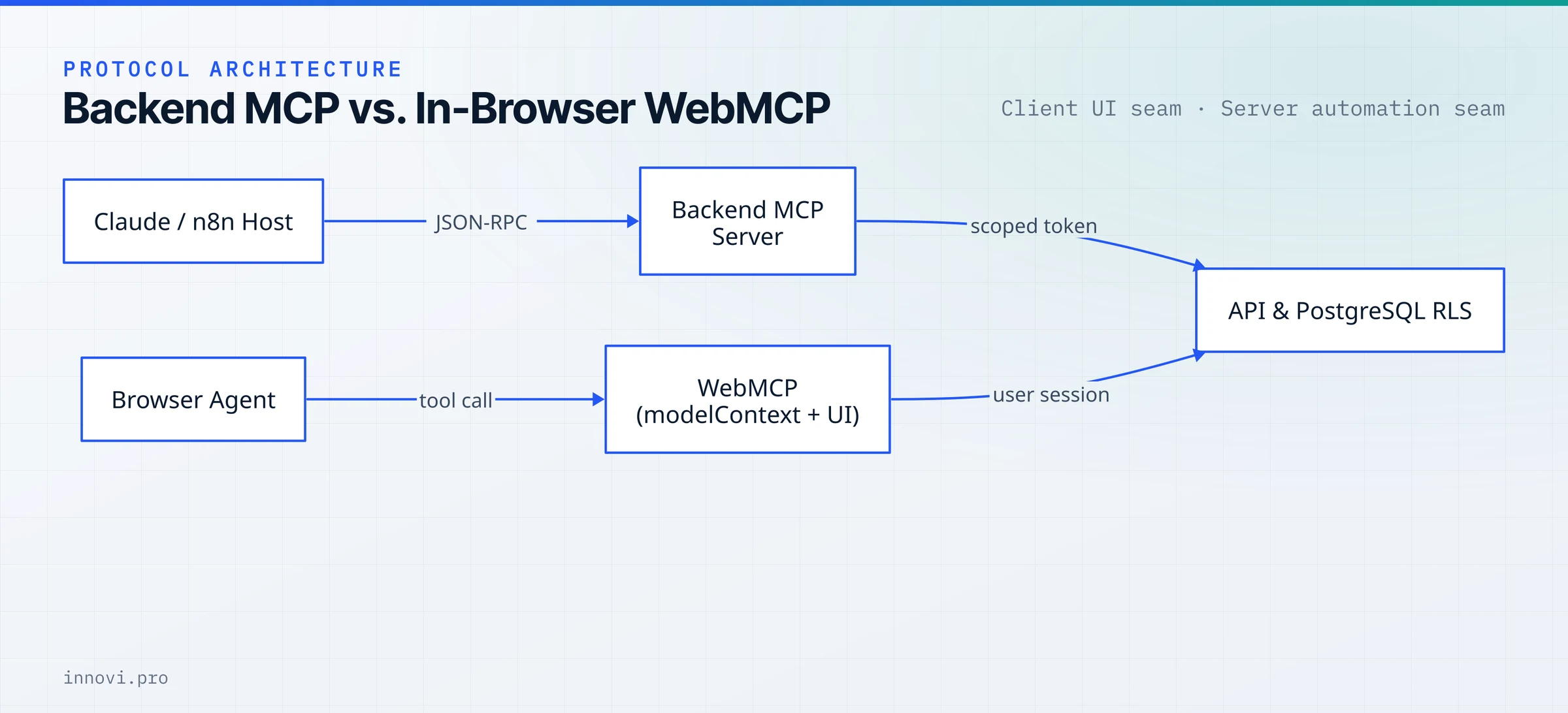
The distinction matters because WebMCP targets cooperative human-in-the-loop work rather than unattended automation. A tool registered in the browser executes inside the user's open tab, reuses their existing authenticated cookies or session tokens, updates the live Vue or React state immediately, and keeps consequential confirmations visible on screen.
A companion exploratory proposal in the repository explores declarative HTML <form> attributes such as toolname and tooldescription, though the current specification focuses on the imperative document.modelContext JavaScript API because rich web applications need dynamic registration tied to active routes and state.
Comparing backend MCP and WebMCP side by side
Choosing between the two protocols gets much easier when you separate where the user sits from where the system of record lives.
| Architecture question | Backend MCP server | Browser WebMCP |
|---|---|---|
| Execution location | Server process over HTTP/SSE or stdio | Live browser tab in client JavaScript |
| Best fit | Headless jobs, cross-system pipelines, external AI hosts | Interactive SaaS screens, collaborative co-pilots, live UI updates |
| Authentication | OAuth tokens, API keys, service credentials | Existing logged-in browser session and cookies |
| Unattended / scheduled runs | Yes, runs cleanly without an open screen | No, tools exist only while the document is open |
| Browser support (late 2026) | Host-agnostic (any MCP client) | Origin trials in Chrome 149 and Edge 150, plus ChatGPT Desktop |
| Main operational risk | Token scope creep and stale external state | Context bloat from too many page tools, cross-origin exposure |
WebMCP is still early compared to server-side MCP, so progressive enhancement is the sensible stance today. According to the project's implementation status tracker, Chrome 149 and Edge 150 run Origin Trials, local testing sits behind about:flags#enable-webmcp-testing (see Chrome's WebMCP docs), and ChatGPT Desktop supports WebMCP directly. Upcoming Brave Leo releases plan to add support too, while Mozilla and WebKit hold open standards positions. Building critical business workflows that depend solely on WebMCP would shut out a large share of users, whereas layering WebMCP on top of existing UI actions upgrades supported browsers safely.
Security and governance still belong on the server
Treating client-side WebMCP as an authorization mechanism is a mistake, for the exact same reason client-side JavaScript validation never secures a normal REST API. Anything executing inside a user's browser tab runs where the user or page scripts can inspect and modify it, and third-party scripts or iframes on the page raise cross-origin questions.
Two protocol controls govern what runs inside the browser page itself:
- Permissions Policy isolation. By default, WebMCP runs in top-level windows and same-origin frames, while cross-origin iframes require explicit delegation via
<iframe allow="tools">or server headers (MDN Permissions Policy guide). - Scoped frame exposure and safety hints. The
exposedTooption limits which secure origins inside a frame tree can discover a registered tool, and tool metadata hints (readOnlyHint,consequentialHint) help browser hosts decide when to ask a person for confirmation before callingexecute.
Behind both WebMCP and backend MCP, actual data access rules still have to live on your API gateway and database. On our own platforms we push tenant and role checks down into PostgreSQL Row-Level Security (RLS) so neither a misconfigured backend MCP server nor a malformed client request can read records belonging to another organization.
Keeping the tool catalog tight matters just as much for reliability as for security. Both Chrome's WebMCP Origin Trial announcement and the specification's best practices warn against registering dozens of overlapping tools upfront, because every schema consumes prompt tokens and increases tool-selection mistakes. Registering tools dynamically per active route, and tearing them down with an AbortController signal when the user leaves that screen, keeps the agent accurate.
A practical adoption plan for software teams
If you are planning an AI integration roadmap over the next two quarters, sequence the work around concrete business bottlenecks rather than protocol novelty:
- Start with backend MCP when workflows span multiple systems or run unattended. Triaging inbound support queues, syncing CRM and ERP records, and querying warehouse metrics belong on server-side MCP servers or durable n8n pipelines.
- Layer WebMCP onto complex operational screens. Workflows where staff filter large financial tables, review clinical charts, or assemble quotes benefit directly when an in-browser assistant calls
document.modelContexttools instead of guessing DOM selectors. - Share one deterministic backend boundary. Route both your UI endpoints and your backend MCP tools through the same typed API contracts and PostgreSQL RLS policies so security posture never forks between human users and AI hosts.
If your team is deciding where to draw those boundaries across legacy services, ERP connectors, or customer-facing portals, explore our MCP, WebMCP and AI integration service or request an independent software architecture audit before committing engineering headcount. You can also reach out directly to walk through your current stack on a 30-minute scoping call.