MCP Explained: The Standard That Makes AI Agents Actually Useful
An LLM on its own is an expensive autocomplete. It can write you a poem about your database, but it cannot query it, change it, or tell you what broke at 3 a.m. The thing that turns a language model into a useful agent is the set of tools you give it. For most of the last two years, wiring up those tools was a custom job for every single app.
The Model Context Protocol (MCP) is the fix. Anthropic open-sourced it in late 2024 and it has become the default way to plug tools, data, and prompts into any LLM-powered application. If you have heard MCP described as "USB-C for AI," that is actually the right metaphor: one connector, many devices, no drivers to write.
This article explains what MCP is, the three pieces that matter, why it changes how you build AI products, and where it hurts.
The problem MCP solves
Before MCP, integrating a tool into an AI app looked like this:
- Write a custom function definition in OpenAI's format.
- Write a different custom definition in Anthropic's format.
- Re-write it again for LangChain.
- Re-write it again for your internal agent framework.
- Keep four copies in sync forever.
Every model vendor shipped its own tool-calling schema. Every framework wrapped it differently. And every single integration (Jira, Postgres, GitHub, your CRM) got re-implemented in every codebase that touched it. Multiply by every team in your company and you have a combinatorial mess.
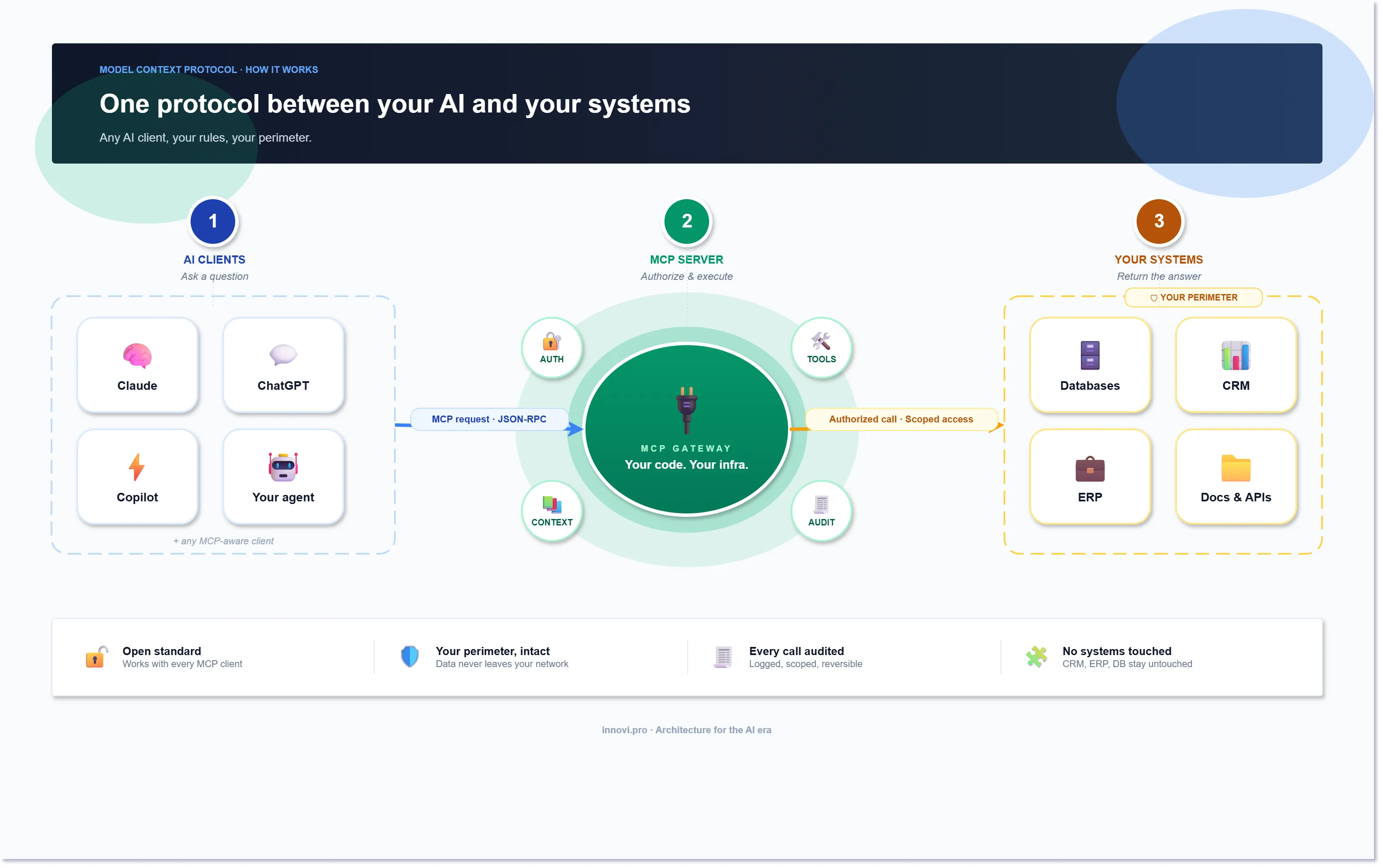
MCP collapses this. You write the integration once, as an MCP server. Any MCP client can use it without you doing anything extra: Claude Desktop, Cursor, your own app, even a competitor's app. The model does not care whether the server is written in Python, TypeScript, or Rust. The client does not care what tools the server exposes until it asks.
That is the whole pitch. It is the same reason USB-C won. Not because it is the most elegant connector ever designed, but because it is the same connector everywhere.
The three pieces
MCP has exactly three moving parts. Learn these and the rest is details.
1. The host is the application the user actually interacts with. Claude Desktop, Cursor, Zed, a custom chatbot, an internal ops console. The host embeds the LLM and owns the UI.
2. The client lives inside the host. It speaks MCP on behalf of the host. Each host can run many clients, one per connected MCP server, and the client handles the JSON-RPC back-and-forth so the host does not have to.
3. The server is where the interesting stuff lives. An MCP server exposes three kinds of things:
- Tools: functions the model can call. "Create a Jira ticket." "Run this SQL." "Send this email."
- Resources: read-only data the model can pull in. A file, a database schema, a Confluence page.
- Prompts: pre-written prompt templates the server offers to the host. "Summarize this incident in the house style."
The client-server handshake is boring and that is the point. The client asks the server what it can do. The server answers. The model picks from that menu. The server does the work and returns the result. Same shape every time, same wire format every time.
What changes when you adopt it
Three things change, and they all compound.
You stop writing glue code
In a pre-MCP world, a sizable fraction of any AI codebase is adapters, one function per tool per framework. With MCP, every integration is a server you write once. The servers are small; most are a few hundred lines. And because the protocol is public, there is already a growing ecosystem of community servers for GitHub, Slack, Postgres, Google Drive, Stripe and more.
For our own tooling we now default to "write the MCP server first, the UI second." The server becomes the canonical contract. Any client, including whatever LLM app we build next, gets it without extra work.
Your agent stops being a silo
Classic agent frameworks bake tool definitions into the agent's code. The agent only knows what the dev hard-coded. MCP flips this: the agent discovers tools at runtime from whichever servers are connected. Add a new server, the agent can immediately use it. No redeploy, no code change on the agent side.
This matters more than it sounds. It means the product team can ship new capabilities by standing up servers, not by shipping new agent releases. It means users can bring their own MCP servers. It means you can build an agent that does not know what it will be asked to do tomorrow and still copes when the request arrives.
Security finally has a natural seam
Because every tool call goes through a server, the server is the perfect place to enforce auth, rate limits, audit logs, and scoping. Want the model to query Postgres but only the analytics schema, only SELECT statements, only for this tenant? That is a single policy in one server, not forty policies spread across every prompt in your stack.
For regulated work (healthcare, finance, anything with PII), this is the first time the security seam has been in a sane place. You can put your zero-trust gateway in front of the MCP server and every LLM, every client, every host inherits the controls.
Where MCP still hurts
It is not a finished standard. Three things to know before you bet a platform on it.
Auth is under-specified. The spec added OAuth in early 2025 but the flows are still awkward for server-to-server scenarios. Most production deployments roll their own token handling. Expect churn here over the next year.
Long-running work is ugly. MCP is request-response. If a tool call takes 30 minutes, say training a model or running a scraper, you have to model it as "start job" + "poll status." Doable, but the protocol does not help you.
Observability is DIY. The protocol says nothing about tracing. If you care about which tool got called with what arguments and how long it took (you do), you have to instrument every server yourself. OpenTelemetry fits well; we add it by default.
None of these are blockers. They are the usual early-standard pain points and the community is moving fast on all three.
When to use it
Use MCP when any of these are true:
- You are building an agent that needs more than two tools.
- You expect the set of tools to grow, especially if non-engineers will add them.
- You need the same set of integrations to work across multiple AI apps.
- You are in a regulated industry and need a clean enforcement point for tool access.
Skip it when:
- You are shipping a single prompt with a single tool and no intent to grow.
- Your use case is pure generation, with no tool calls and no data retrieval.
- You are inside a framework that already does this well and you have zero plans to leave it.
Most production AI work falls into the first bucket. That is why MCP adoption has been so fast.
How we use MCP at Innovi Pro
Every agent we build for clients now starts as an MCP server plus a thin host. The server owns the domain: clinical workflows for healthcare, deal data for sales tools, infra state for internal ops. The host is whatever UI the customer needs: Slack, a web app, a VS Code extension.
Two recent patterns we keep reaching for:
- One MCP server per bounded context. If you have four domains, you get four servers. Each one is owned by the team that owns the domain. This mirrors microservices discipline and scales much better than a "god server" with everything in it.
- Readonly resources before tools. Start by exposing data as MCP resources. Let the model read first. Add write tools only once you see what it actually needs. You end up with a smaller, safer surface.
The bottom line
MCP is not magic. It is a narrow, well-scoped protocol that makes integrations cheap and composable. That is it. But because integrations are the single biggest cost center in real AI products, making them cheap changes what you can build.
If you are starting a new AI feature today, start with an MCP server. If you have an existing agent, the migration we have seen takes days, not weeks. If you are on the buying side, picking AI tooling for your company, "speaks MCP" is a question worth asking.
The tools your AI can reach are the product. MCP is how you give it more of them, without the wiring eating your budget.